Relay
Sends your current file or selected lines from the editor to a CLI coding agent such as Claude Code, Cursor, Aider or Goose. Available for JetBrains IDEs and VS Code.
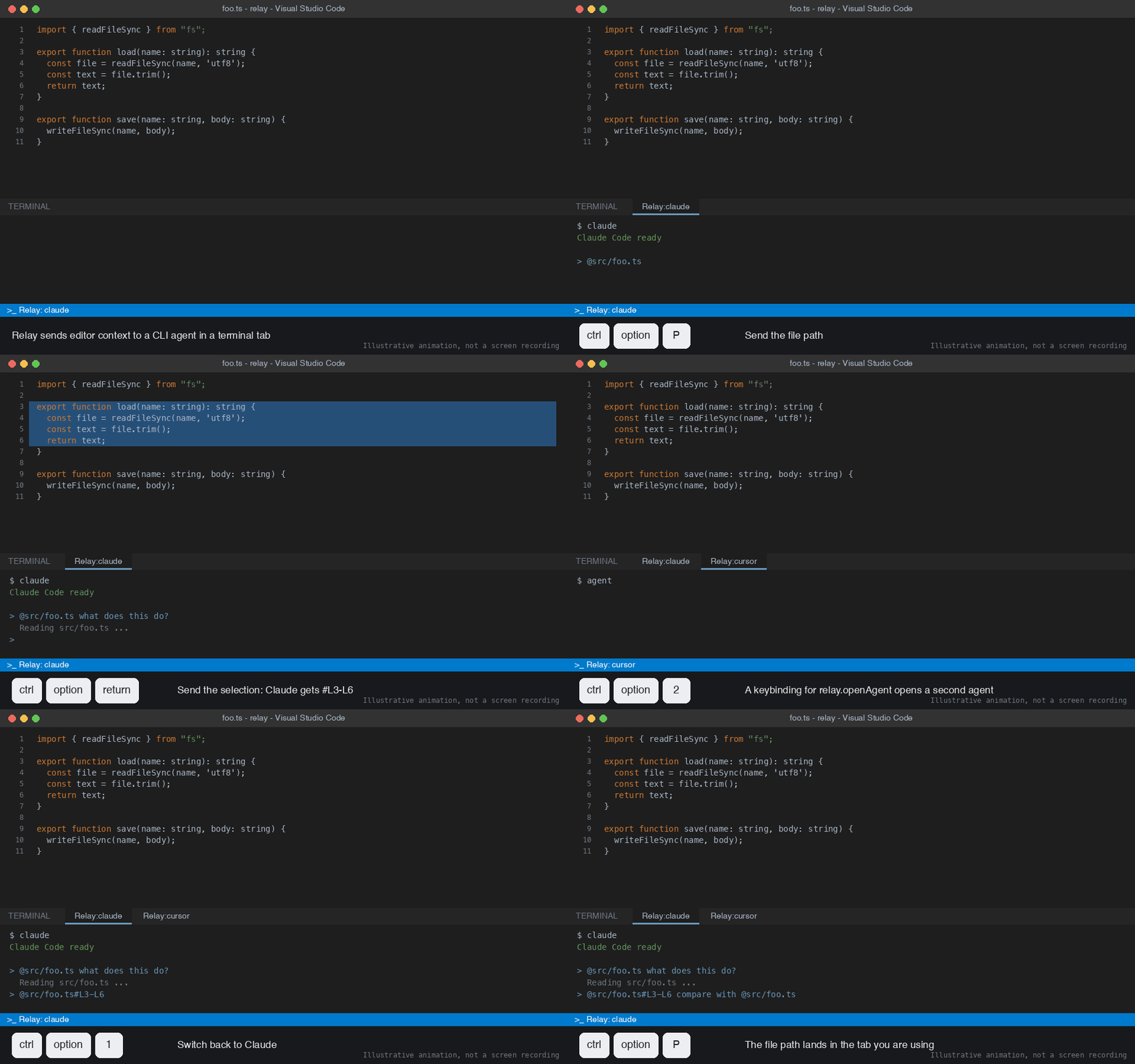
Relay sends editor context to a CLI coding agent. Press a shortcut in the editor. Relay opens a terminal tab named Relay:<agent>, starts the agent once, and pastes a reference to your file or selected lines into the agent prompt. It does not press Enter, so you keep typing.
It ships as two products from one public repository. They are the same tool.
| Product | Store name | Platform | Language | Version |
|---|---|---|---|---|
| JetBrains plugin | Relay | IntelliJ IDEA, PyCharm, WebStorm and other JetBrains IDEs, build 253 (2025.3) or newer | Kotlin, Gradle | 1.5.0 |
| VS Code extension | Relay for CLI Agents | VS Code 1.93 or newer | TypeScript, npm | 1.5.2 |
How it works
- Open a file in the editor.
- Press
Ctrl+Alt+Tto open Relay. A terminal tabRelay:<agent>starts the agent. - Press
Ctrl+Alt+Pto send the file path, or select lines and pressCtrl+Alt+Enter. - Relay pastes a reference such as
@src/Foo.kt:10-20into the agent prompt. - Keep typing your request. The agent reads the lines from the saved file.
On macOS read the keys as Control and Option. Relay sends a reference, not the code.
Demo
VS Code:
JetBrains:
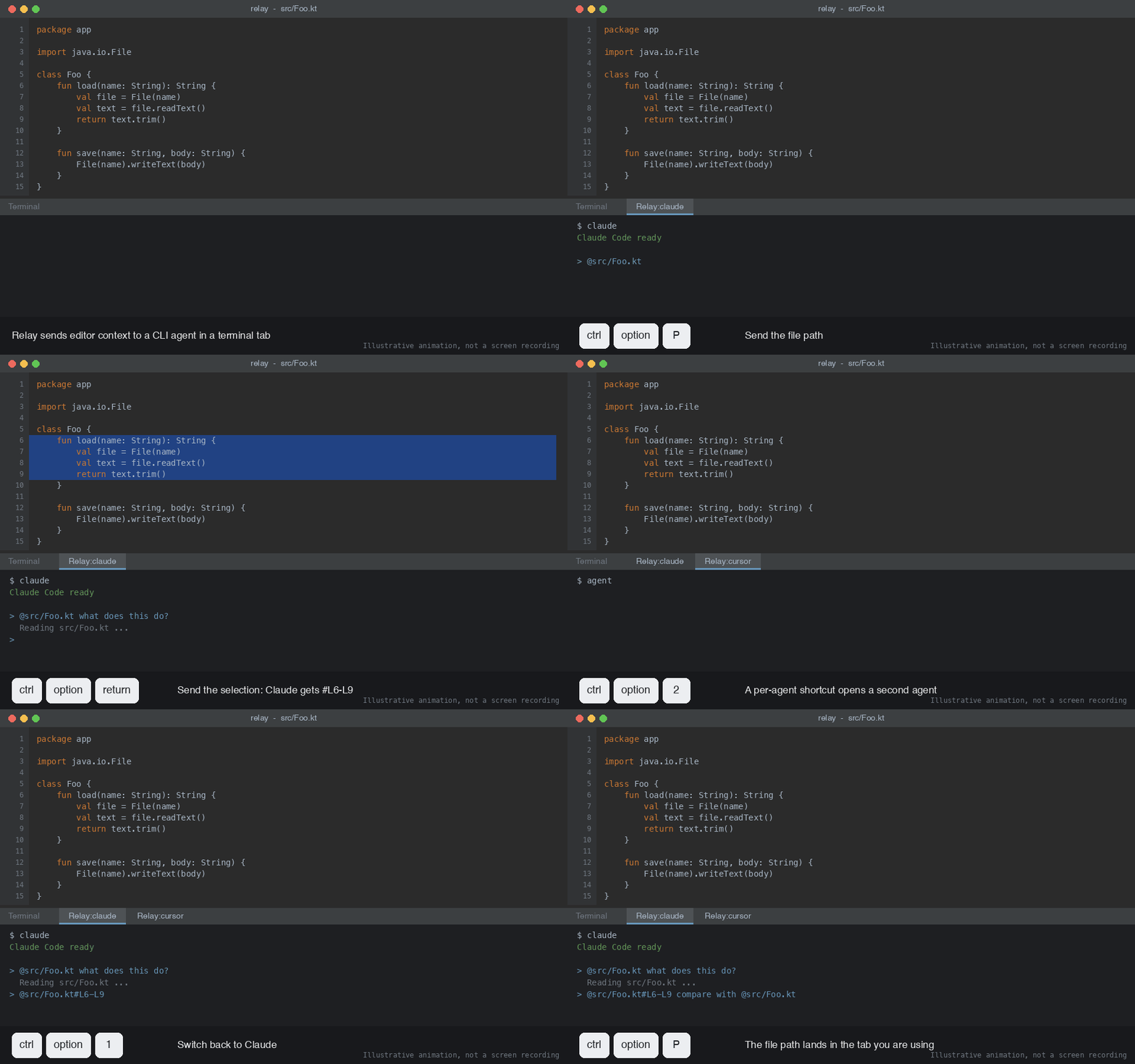
Illustration of the Relay workflow, not a screen recording.
Features
- Formats the reference for the agent in use.
- One terminal tab per agent. Several agents run side by side.
- Sends go to the active Relay terminal, else the last one used, else a new one for the default agent.
- Agent profiles with a name, a command and a reference mode:
auto,add,read-only,at-mention,plain. - Per-agent keys to open a specific agent.
- Closes terminal tabs left over from a previous IDE or window session.
- Works with Claude Code, Cursor, Aider, Goose and any CLI agent you configure.
Download and install
| Option | Link |
|---|---|
| Repository | github.com/sulsira/relay |
| JetBrains zip, v1.5.0 | relay-1.5.0.zip |
| VS Code Marketplace | Relay for CLI Agents |
| VS Code file, v1.5.2 | relay-vscode-1.5.2.vsix |
File names carry the version. Each release replaces the old file, so an older direct link can return 404. The repository always has the current one.
JetBrains plugin
The plugin is not on the JetBrains Marketplace. Install the unsigned zip from disk.
- Download
relay-1.5.0.zip. Do not unzip it. - Open Settings, then Plugins.
- Click the gear icon next to Installed.
- Choose Install Plugin from Disk… and select the zip.
- Click OK. Restart the IDE when asked.
- Check that Settings, Tools, Relay exists. Press
Ctrl+Alt+Tin a file.
Requires IDE build 253 or newer and the bundled Terminal plugin enabled. Full steps are in the JetBrains README.
VS Code extension
- Open the Extensions view, search
Relay for CLI Agents(publishersulsira) and click Install. - Or download
relay-vscode-1.5.2.vsixand runcode --install-extension relay-vscode-1.5.2.vsix. - Reload the window with
Developer: Reload Window. - Check that the status bar shows
Relay: <agent>. PressCtrl+Alt+Tin a file.
Requires VS Code 1.93 or newer. Full steps are in the VS Code README.
Engineering notes
- Monorepo with one folder per platform (
jetbrains/,vscode/). Each has its own README, changelog, version, tests and build. - The JetBrains plugin uses the IntelliJ Platform SDK and the Reworked Terminal API. That API is experimental, so class locations may change between IDE releases.
- The VS Code extension uses the terminal and shell-integration APIs. The formatting logic is a separate module with no VS Code imports, so it is unit tested.
- Tests: 10 unit tests for the VS Code format module, 2 JetBrains test classes, and an end-to-end scenario in a real VS Code window. It checks the exact text that reaches 4 agents, using
cat > fileas a stand-in agent, and proves Relay does not press Enter. - Installable files are committed with SHA-256 checksums, so you can install without building.